Big Data Notes
All Topics (19)
- 1. What is Big Data?
- 2. Big Data Characteristics
- 3. Types of Big Data
- 4. Traditional Data vs Big Data
- 5. Evolution of Big Data
- 6. Challenges with Big Data
- 7. Technologies Available for Big Data
- 7. Infrastructure for Big Data
- 9. Uses of Data Analytics
- 10. Hadoop
- 11. Hadoop Core Components
- 12. Hadoop Ecosystem
- 13. Hive Physical Architecture
- 14. Hadoop Limitations
- 15. RDBMS vs Hadoop
- 16. Hadoop Distributed File System (HDFS)
- 17. Processing Data with Hadoop
- 18. Hadoop YARN
- 19. MapReduce Programming
1. What is Big Data?
Big Data refers to extremely large and complex datasets that cannot be efficiently stored, processed, or analyzed using traditional data processing tools such as relational databases.
These datasets are generated continuously from multiple sources such as social media platforms, sensors, online transactions, videos, images, and digital devices. Because of the massive size and complexity of this data, special technologies are required to store and analyze it.
Examples of Big Data
-
Social media posts and comments
-
Online shopping transactions
-
YouTube videos and multimedia content
-
Sensor and IoT device data
-
Satellite images
-
Server and website logs
2. Characteristics of Big Data (5 V's)
Big Data is commonly described using five important characteristics known as the 5 V’s.
2.1 Volume
Volume refers to the huge amount of data generated every day from various sources.
Example:
-
Billions of photos and posts uploaded daily on social media platforms.
2.2 Velocity
Velocity refers to the speed at which data is generated, collected, and processed.
Example:
-
Real-time stock market updates
-
GPS location tracking
-
Online transactions
2.3 Variety
Variety refers to the different types of data formats that are generated.
Types of Data:
Structured Data
-
Organized in tables with rows and columns
-
Example: Databases, spreadsheets
Semi-Structured Data
-
Partially organized data
-
Example: XML, JSON files
Unstructured Data
-
Data without a fixed structure
-
Example: Images, videos, audio files, text
2.4 Veracity
Veracity refers to the accuracy, reliability, and quality of data.
Sometimes data may contain errors, missing values, or noise. If the data quality is poor, it may lead to incorrect analysis and wrong decisions.
2.5 Value
Value refers to the useful insights and benefits obtained from data analysis.
Organizations analyze big data to understand customer behavior, improve services, and increase profits.
Example:
-
Online shopping websites recommend products based on user behavior.
3. Sources of Big Data
Big Data is generated from many different sources.
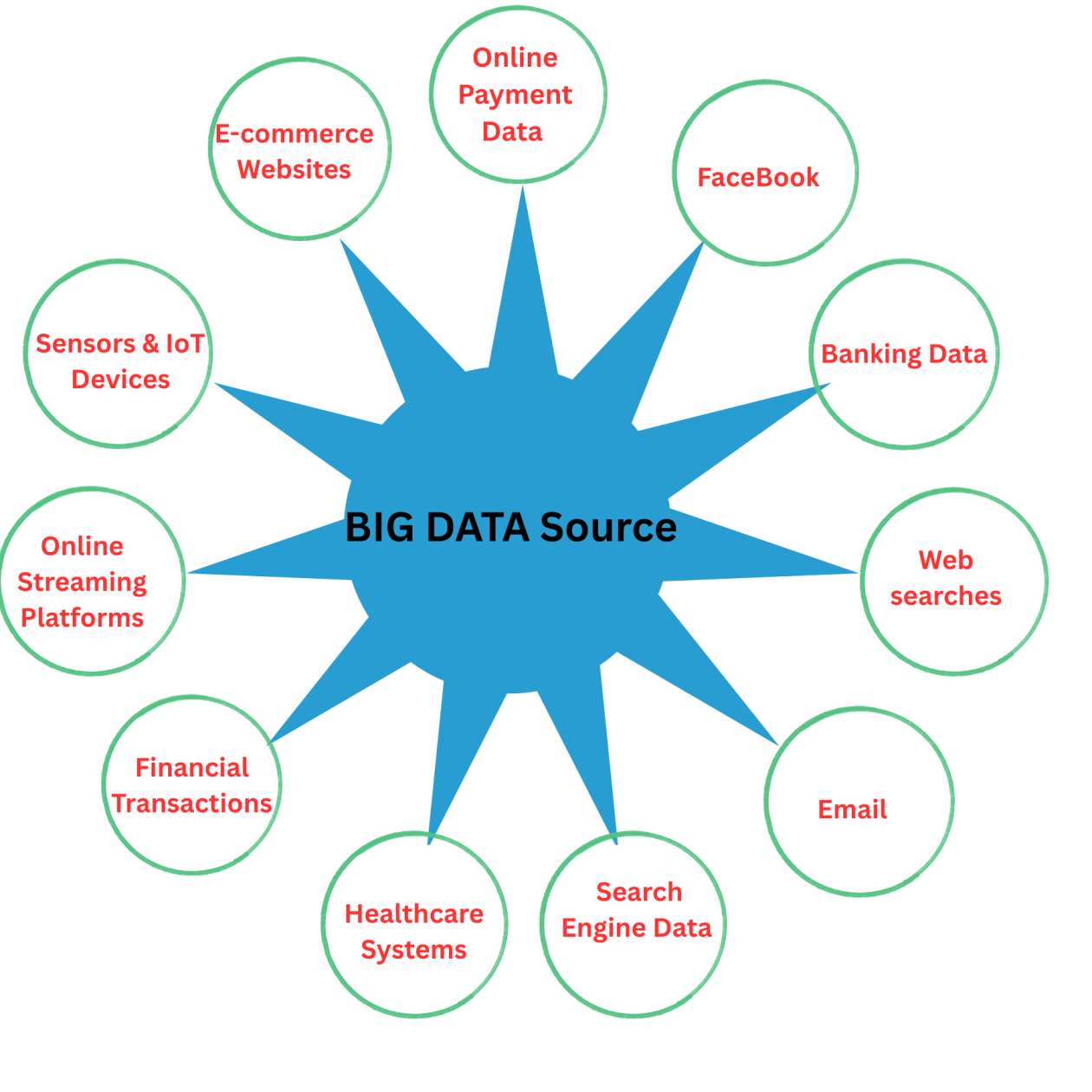
3.1 Social Media
Social media platforms generate huge amounts of data every second.
Examples:
-
Facebook
-
Instagram
-
Twitter
-
YouTube
Types of data:
-
Likes
-
Comments
-
Shares
-
Videos
3.2 Machine and IoT Data
Machines and smart devices collect data using sensors.
Examples:
-
Smart home devices
-
GPS trackers
-
Industrial machines
-
Wearable devices
3.3 Transactional Data
Transactional data is generated during online and offline business transactions.
Examples:
-
E-commerce purchases
-
Online payments
-
Banking transactions
3.4 Government and Scientific Data
Government agencies and research organizations produce large datasets.
Examples:
-
Healthcare records
-
Weather data
-
Scientific research data
3.5 Web and Server Logs
Websites and applications record user activities.
Examples:
-
Website clickstream data
-
Application usage logs
-
Server logs
4. Importance of Big Data
Big Data plays an important role in modern industries and organizations.
Benefits of Big Data
-
Better decision making
-
Understanding customer behavior
-
Fraud detection
-
Improving business efficiency
-
Identifying trends and patterns
-
Developing new products and services
Example
E-commerce companies analyze customer searches and purchase history to recommend personalized products.
5. Big Data Technologies
Traditional systems cannot handle Big Data efficiently, so specialized technologies are used.
5.1 Hadoop Ecosystem
Hadoop is an open-source framework used for storing and processing large datasets across distributed systems.
Main components of Hadoop:
HDFS (Hadoop Distributed File System)
-
Used for distributed storage of big data.
MapReduce
-
A programming model used for processing large datasets.
YARN (Yet Another Resource Negotiator)
-
Manages cluster resources and job scheduling.
Other tools in Hadoop ecosystem:
-
Hive
-
Pig
5.2 Apache Spark
Apache Spark is a fast big data processing engine.
Features:
-
Faster than MapReduce
-
Supports real-time data processing
-
Used in machine learning and streaming applications
5.3 NoSQL Databases
NoSQL databases are designed to store and manage large volumes of unstructured or semi-structured data.
Examples:
-
MongoDB
-
Cassandra
-
CouchDB
5.4 Cloud Platforms
Cloud computing makes it easier to store and process Big Data.
Examples of cloud platforms:
-
Amazon Web Services (AWS)
-
Microsoft Azure
-
Google Cloud Platform (GCP)
6. Applications of Big Data
Big Data is widely used in many fields.
6.1 Healthcare
-
Disease prediction
-
Patient data analysis
-
Medical research
6.2 Business and Marketing
-
Customer segmentation
-
Targeted advertising
-
Sales prediction
6.3 Banking and Finance
-
Fraud detection
-
Risk analysis
-
Credit scoring
6.4 Transportation
-
Traffic management
-
Route optimization used by ride-sharing services
6.5 Social Media Platforms
-
Trend analysis
-
Sentiment analysis (understanding user opinions and emotions)
7. Future of Big Data
Big Data is becoming the backbone of modern technologies. With the growth of Artificial Intelligence, Machine Learning, Cloud Computing, and IoT, the importance of Big Data will continue to increase.
Future applications include:
-
Smart cities
-
Automated systems
-
Advanced healthcare analytics
-
Personalized digital services
2. Big Data Characteristics
Big Data is commonly described through specific characteristics that define its nature and complexity.
Initially, Big Data was explained using 3 V’s (Volume, Velocity, Variety). Later, researchers added more characteristics to better describe Big Data.
Today, Big Data is usually explained using 5 V’s or sometimes 7 V’s.
1. Volume (Amount of Data)
Meaning
Volume refers to the huge amount of data generated every second from various sources.
Examples
-
Social media platforms generate petabytes of data daily.
-
Users upload hundreds of hours of videos every minute on video platforms.
-
Online shopping websites store millions of customer transactions.
Why It Matters
Traditional databases cannot store or manage such massive datasets efficiently. Therefore, Big Data technologies like distributed storage systems and cloud platforms are used.
2. Velocity (Speed of Data Generation)
Meaning
Velocity refers to the speed at which data is generated, collected, and processed.
Examples
-
Stock market data updates within milliseconds.
-
GPS tracking systems update location data continuously.
-
Social media platforms generate likes, comments, and posts rapidly.
Why It Matters
High-speed data requires real-time processing systems to analyze information quickly and make instant decisions.
3. Variety (Different Types of Data)
Meaning
Variety refers to the different formats and types of data generated from multiple sources.
Types of Data
1. Structured Data
-
Organized in rows and columns
-
Stored in relational databases
-
Example: Database tables, spreadsheets
2. Semi-Structured Data
-
Partially organized data
-
Contains tags or markers
-
Example: XML, JSON, HTML
3. Unstructured Data
-
Data without a predefined format
-
Example: Images, videos, audio files, emails, social media posts
Why It Matters
Managing different types of data requires flexible storage systems such as NoSQL databases.
4. Veracity (Trustworthiness of Data)
Meaning
Veracity refers to the accuracy, reliability, and quality of data.
Challenges
-
Incomplete data
-
Duplicate data
-
Incorrect or noisy data
Examples
-
Fake social media profiles generating misleading data
-
Incorrect sensor readings
Why It Matters
Poor-quality data can lead to wrong analysis and incorrect business decisions. Therefore, data cleaning and validation processes are necessary.
5. Value (Importance of Data)
Meaning
Value refers to the useful insights and benefits derived from analyzing Big Data.
Examples
-
Predicting customer behavior
-
Improving business strategies
-
Detecting fraud in banking systems
-
Optimizing transportation routes
Why It Matters
Even if data is large, fast, and diverse, it is useless unless it provides meaningful insights and business value.
Additional Characteristics (7V Model)
Some modern Big Data frameworks include two additional characteristics, expanding the model to 7 V’s.
6. Variability
Meaning
Variability refers to the inconsistency and fluctuations in data flow.
Examples
-
Social media trends changing rapidly
-
Seasonal increases in online shopping
-
Weather data showing unpredictable patterns
Why It Matters
Systems must be able to handle changing data patterns and sudden spikes in data volume.
7. Visualization
Meaning
Visualization refers to the presentation of Big Data in graphical formats so that it can be easily understood.
Examples of Visualization Tools
-
Dashboards
-
Graphs and charts
-
Data reports
Common Tools Used
-
Tableau
-
Power BI
-
QlikView
Why It Matters
Visualization helps analysts and decision-makers interpret complex data quickly and effectively.
Summary of Big Data Characteristics
| Characteristic | Meaning | Example |
|---|---|---|
| Volume | Large amount of data | Social media data, video uploads |
| Velocity | Speed of data generation | Stock market updates, GPS tracking |
| Variety | Different data types | Text, images, videos |
| Veracity | Accuracy and reliability | Authentic vs fake data |
| Value | Useful insights from data | Customer behavior analysis |
| Variability | Inconsistent data flow | Social media trends |
| Visualization | Data shown in visual form | Dashboards and charts |
3. Types of Big Data
Big Data is broadly classified into three main types:
-
Structured Data
-
Unstructured Data
-
Semi-Structured Data
Additionally, Big Data can also be categorized based on its source.
1. Structured Data
Definition
Structured data is organized and arranged in a fixed format (rows, columns, tables).
It can be easily stored, processed, and analyzed using traditional databases (SQL).
Characteristics
-
Highly organized and well-defined
-
Easy to search, retrieve, and analyze
-
Follows a definite schema
-
Stored in relational databases
Examples
-
Bank transaction records
-
Employee details (name, salary, ID)
-
Student records in tables
-
Sales records (Excel sheets)
-
ATM transaction logs
Tools Used
-
SQL databases: MySQL, Oracle, PostgreSQL
-
Data warehouses
2. Unstructured Data
Definition
Unstructured data does not have a predefined format or structure.
It is complex and requires advanced tools to store and process.
Characteristics
-
Very complex and difficult to analyze
-
Does not follow any schema
-
Cannot be stored directly in relational databases
Examples
-
Images, videos, audio files
-
Social media posts (tweets, comments, reels)
-
Emails
-
PDFs, documents
-
Website content
-
CCTV footage
Tools Used
-
Hadoop (HDFS)
-
Apache Spark
-
NoSQL databases (MongoDB, Cassandra)
3. Semi-Structured Data
Definition
Semi-structured data does not follow a rigid table structure, but contains some organizational properties like tags or markers.
It lies between structured and unstructured data.
Characteristics
-
Flexible structure
-
Contains metadata
-
Easier to analyze than unstructured data
-
Does not require a fixed schema
Examples
-
JSON files
-
XML files
-
HTML pages
-
Emails (headers structured, body unstructured)
-
Log files
-
Sensor data with tags
Tools Used
-
NoSQL databases
-
Big Data frameworks
-
Document stores (MongoDB)
4. Summary Table – Types of Big Data
| Type of Data | Structure | Examples | Storage / Tools |
|---|---|---|---|
| Structured | Organized in tables | Banking records, Excel sheets | SQL Databases |
| Unstructured | No fixed format | Videos, images, social media posts | Hadoop, Spark, NoSQL |
| Semi-Structured | Partially organized | JSON, XML, log files | NoSQL, MongoDB |
4. Traditional Data vs Big Data
1. Definition
Traditional Data
Traditional Data is small-sized, structured data stored in traditional databases like RDBMS (Relational Database Management Systems).
Examples
- School student records
- Bank account details
- Employee salary database
This data is usually organized in rows and columns.
| Student ID | Name | Marks |
|---|---|---|
| 101 | Rahul | 85 |
| 102 | Priya | 90 |
Big Data
Big Data refers to extremely large, fast, and complex data coming from many different sources.
Traditional systems cannot handle it efficiently because of its huge volume, speed, and variety.
Examples
- Facebook posts
- YouTube videos
- Instagram reels
- GPS tracking data
- Online shopping activity
2. Data Size (Volume)
Traditional Data
- Small in size
- Usually measured in MBs or GBs
Example
A school database storing student records may only take 500 MB.
Examples:
- Excel files
- Small SQL databases
Big Data
- Extremely large in size
- Measured in TBs, PBs, or even EBs
Example
Netflix stores petabytes of watch-history data from millions of users.
Examples:
- Social media data
- YouTube video storage
- Sensor and IoT data
3. Data Types (Variety)
Traditional Data
Contains only structured data.
Example
Bank database table:
| Account No | Name | Balance |
|---|---|---|
| 1001 | Amit | 5000 |
Big Data
Contains:
- Structured Data
- Semi-Structured Data
- Unstructured Data
(a) Structured Data
Well-organized data in tables.
Example
Customer information in SQL databases.
(b) Semi-Structured Data
Data with some structure but not fully organized in tables.
Examples
- JSON
- XML
Example JSON:
{
  "name": "Rahul",
  "product": "Mobile"
}
(c) Unstructured Data
Data without a fixed format.
Examples
- Videos
- Images
- Audio files
- Social media posts
Example:
Instagram reels and CCTV footage.
4. Processing Speed (Velocity)
Traditional Data
- Processing is slower
- Mostly batch processing
Example
A bank processes all daily transactions at night.
Big Data
- Very fast processing
- Real-time or near real-time processing
Examples
- Google Maps live traffic updates
- UPI payment processing
- Uber live driver tracking
Data keeps arriving continuously every second.
5. Storage Systems
Traditional Data
Stored in a single server or limited storage systems.
Examples
- MySQL
- Oracle Database
Used mainly for small-scale applications.
Big Data
Stored in distributed systems across many servers.
Examples
- Hadoop HDFS
- Cloud storage
Example
YouTube stores videos across thousands of servers worldwide.
6. Data Processing Methods
Traditional Data
Uses SQL queries and centralized processing.
Example
SELECT * FROM Students;Works well for small datasets.
Big Data
Uses parallel and distributed processing.
Tools
- Hadoop
- Spark
- NoSQL databases
- Machine Learning tools
Example
Amazon analyzes millions of customer records to recommend products.
7. Scalability
Traditional Data
Uses Vertical Scaling.
Meaning:
Increase the power of one machine by adding more RAM or CPU.
Example
Upgrading RAM from 4GB to 16GB.
This approach is expensive and limited.
Big Data
Uses Horizontal Scaling.
Meaning:
Add more machines to the system.
Example
Increasing from 10 servers to 100 servers.
This method is cheaper and more flexible.
8. Cost
Traditional Data
- Expensive database servers
- High maintenance cost
Example
Oracle database licenses are costly.
Big Data
- Uses open-source tools
- Uses commodity hardware
Examples
- Hadoop
- Spark
These tools reduce overall cost.
9. Data Accuracy and Quality
Traditional Data
Data is usually clean, accurate, and verified.
Example
Bank account balance records.
Errors are minimal.
Big Data
Because of huge data volume, data may contain:
- Duplicate data
- Noise
- Incomplete information
Example
Spam comments on social media.
Therefore, data cleaning is very important.
10. Applications
Traditional Data Applications
- Banking systems
- School databases
- Payroll systems
- Inventory management
Example
School attendance system.
Big Data Applications
Social Media
Facebook analyzes user behavior and interests.
E-commerce
Amazon recommends products based on user activity.
Healthcare
Disease prediction and patient monitoring.
Transportation
Uber and Ola use live location tracking.
Weather Forecasting
Satellite data analysis.
AI and Machine Learning
Chatbots and recommendation systems.
Real-Life Comparison Example
Traditional Data Example
A school database contains:
- Student names
- Marks
- Attendance
This data is structured and easily managed using SQL databases.
Big Data Example
YouTube handles:
- Billions of videos
- Comments
- Likes
- Watch history
- Live streams
Traditional databases cannot efficiently manage such huge and fast-growing data.
Comparison Table
| Feature | Traditional Data | Big Data |
|---|---|---|
| Size | MB–GB | TB–PB–EB |
| Data Type | Structured | Structured, Semi-Structured, Unstructured |
| Processing Speed | Slow | Fast |
| Processing Method | Batch | Real-time |
| Storage | RDBMS | Hadoop, Cloud |
| Scalability | Vertical | Horizontal |
| Cost | High | Lower |
| Tools | SQL | Hadoop, Spark, NoSQL |
| Examples | Bank records | Facebook, YouTube |
One-Line Difference
Traditional Data
Small, structured, and easy-to-manage data.
Big Data
Very large, fast, and complex data coming from multiple sources.
5. Evolution of Big Data
Big Data did not appear suddenly.
It evolved step by step as computers, the internet, mobile devices, and storage technologies improved over time.
1. Early Data Era (1960–1980)
What Happened?
- Computers started storing data for the first time.
- Mainframe computers were introduced.
- Data was very small and mostly text-based.
Storage Methods
- Magnetic tapes
- Floppy disks
Characteristics
- Very limited storage capacity (KBs or MBs)
- Only structured data was used
- No concept of “Big Data”
Examples
- Bank transaction records
- Payroll systems
- Billing systems
Real-Life Example
A bank stored customer account details in simple text files on magnetic tapes.
2. Database Era (1980–1990)
What Changed?
Relational Database Management Systems (RDBMS) became popular.
Popular Technologies
- Oracle
- IBM DB2
- SQL
Data was organized into tables with rows and columns.
Why Was It Important?
- Easier data storage
- Faster data retrieval
- Better data management
Used in:
- Banks
- Schools
- Companies
Limitation
These systems could handle:
- Only structured data
- Small or medium-sized datasets
They could not process images, videos, or huge data volumes.
Example
Student records stored in SQL databases.
| Student ID | Name | Marks |
|---|---|---|
| 101 | Rahul | 88 |
3. Internet Explosion (1990–2005)
What Happened?
The internet became widely available.
People started using:
- Websites
- Emails
- Online shopping
- Mobile phones
As a result, data started growing rapidly.
New Sources of Data
- Emails
- Websites
- Online forms
- Digital photos
- Mobile phone data
Problem
Traditional databases could not handle:
- Huge amounts of data
- Different formats (images, videos)
- Fast data generation
Example
Millions of users started uploading photos and sending emails every day.
4. Birth of Big Data Concept (2000–2010)
Introduction of the Term “Big Data”
In 2001, Doug Laney introduced the concept of the 3Vs of Big Data:
- Volume → Huge amount of data
- Velocity → High speed of data generation
- Variety → Different types of data
What Was Happening During This Time?
- Social media platforms started growing
- Smartphones became popular
- Companies started analyzing huge datasets
Examples
- YouTube
Google’s Contribution
Google introduced:
- Google File System (GFS)
- MapReduce programming model
These technologies enabled distributed data processing across many machines.
Example
Google needed to process billions of web pages for its search engine.
5. Hadoop Revolution (2006–2015)
Birth of Hadoop
Inspired by Google’s ideas, Doug Cutting and Mike Cafarella created Hadoop.
Hadoop became the most important Big Data framework.
Why Hadoop Was Revolutionary
Features
- Stores data across multiple machines
- Fault tolerance (data is safe even if one machine fails)
- Cost-effective
- Uses commodity hardware
Hadoop Ecosystem
Main components:
- HDFS
- MapReduce
- YARN
- Hive
- Pig
- HBase
- Sqoop
Industries Started Using Big Data
- E-commerce
- Banking
- Healthcare
- Social media
Example
An e-commerce company stores millions of customer transactions using Hadoop.
6. Real-Time Big Data and NoSQL (2010–Present)
Problem with Hadoop
Hadoop was mainly batch-processing oriented and slower for real-time applications.
New Real-Time Technologies
Real-Time Processing Tools
- Apache Spark
- Apache Storm
- Apache Flink
These tools process data much faster.
NoSQL Databases
New databases were developed to handle:
- Unstructured data
- Semi-structured data
Examples
- MongoDB
- Cassandra
- CouchDB
Modern Applications
- Recommendation systems
- Fraud detection
- Social media analytics
- Autonomous vehicles
Example
Netflix recommends movies instantly based on user activity using real-time analytics.
7. Cloud-Based Big Data (2015–Now)
What Changed?
Companies started moving Big Data systems to the cloud.
Popular Cloud Platforms
- Amazon Web Services (AWS)
- Google Cloud
- Microsoft Azure
Benefits of Cloud Big Data
- Unlimited storage
- Scalable resources
- On-demand processing
- Lower hardware cost
Example
A startup can now store and process huge data without buying expensive servers.
8. Big Data + AI + Machine Learning (2020–Now)
Current Situation
Big Data is now powering:
- Artificial Intelligence (AI)
- Machine Learning (ML)
AI systems need massive amounts of data for training.
Modern Technologies
- Deep Learning
- Neural Networks
- Data Lakes
- MLOps
- Predictive Analytics
Applications
Self-Driving Cars
Cars analyze sensor and camera data in real time.
Virtual Assistants
- Alexa
- Siri
- Google Assistant
Healthcare
AI predicts diseases using patient data.
Personalized Advertising
Social media platforms show customized ads.
Chatbots
AI chatbots learn from huge datasets.
Example
Netflix uses Big Data and AI to suggest personalized movies for every user.
Timeline of Big Data Evolution
| Stage | Time Period | Key Development |
|---|---|---|
| 1 | 1960–1980 | Early computers and small data |
| 2 | 1980–1990 | RDBMS and SQL databases |
| 3 | 1990–2005 | Internet explosion |
| 4 | 2000–2010 | Big Data concept and 3Vs |
| 5 | 2006–2015 | Hadoop revolution |
| 6 | 2010–Present | Spark, NoSQL, real-time processing |
| 7 | 2015–Present | Cloud-based Big Data |
| 8 | 2020–Present | Big Data with AI and ML |